Section Connection
Various connection settings.
AllowedClientVersion
The version of the client application supported by the server. The value of the property contains an identifier string, which must be sent to the server by the client application. Client applications having incorrect version are prohibited from connecting to the server. If the value of the property is set to an empty string, then the client applications of any version are supported by the server.
<property-str name="AllowedClientVersion" value=""/>
AllowedProtocolVersions
This setting is obsolete.
<property-uint-list name="AllowedProtocolVersions"/>
SessionsTimeoutsCheckInterval
This option is used to define the number of seconds to wait before scheduling the next session state check.
<property-uint name="SessionsTimeoutsCheckInterval" value="3"/>
ClientPingInterval
The interval between pinging a client session to detect silently dead sessions (in seconds). Use 0 if you want to turn off this functionality.
<property-uint name="ClientPingInterval" value="300"/>
LobbyStatsUpdateInterval
The interval between sending the statistics from the lobbyserver to the client application (in seconds).
<property-uint name="LobbyStatsUpdateInterval" value="60"/>
UseDisplacingLogin
This parameter determines whether the player should be kicked out of the table upon new login. Default: true – the player is not kicked out of the table when he reconnects. Possible values: true, false.
<property-bool name="UseDisplacingLogin" value="true"/>
UseTermsOfUseLogin
If set to false, the Terms of Use feature is completely disabled and the pop-up never appears. If set to true, the feature can be managed on the Terms of Use page in the Backoffice (publish, activate, deactivate).
<property-bool name="UseTermsOfUseLogin" value="true"/>
ConsiderRepeatedLoginAsReconnect
This setting defines what happens when a player who already has an active session logs in again, for example, in a new browser tab or on another device, while AllowMultiLogin = false. Possible values: true (the new login is treated as a reconnect: the previous session is closed, and the player continues in the new one) and false (the new login is rejected with a message that the player is already logged in, and the previous session stays active).
<property-bool name="ConsiderRepeatedLoginAsReconnect" value="true"/>
AllowMultiLogin
This setting enables multiple logins to the client application with one authorization token. This can be used in the integrated solutions, for example, if the customer opens tables by the link, and each table is opened in a separate window (multi-table mode). In this case, multiple logins will be allowed for these windows if AllowMultiLogin = true. However, there are also certain limitations to multiple logins:
- The sessions can only be opened through Auth with empty login and password;
- If a new login is done with login and password, the previously opened sessions are stopped.
<property-bool name="AllowMultiLogin" value="true"/>
AllowMultiLoginOnlyForSameIP
This setting is only relevant if AllowMultiLogin = true. If AllowMultiLoginOnlyForSameIP is enabled, a player can have multiple sessions only from the same IP address, and a login from a different IP address is rejected with an error. True by default.
<property-bool name="AllowMultiLoginOnlyForSameIP" value="true"/>
AllowMultiLoginOnlyForSameDevice
This setting is only relevant if AllowMultiLogin = true. If AllowMultiLoginOnlyForSameDevice is enabled, a player can have multiple sessions only from the same device, and a login from a different device is rejected with an error. False by default. This setting and AllowMultiLoginOnlyForSameIP are independent and can be enabled together.
<property-bool name="AllowMultiLoginOnlyForSameDevice" value="false"/>
ClientTitle
The title of the desktop client application.
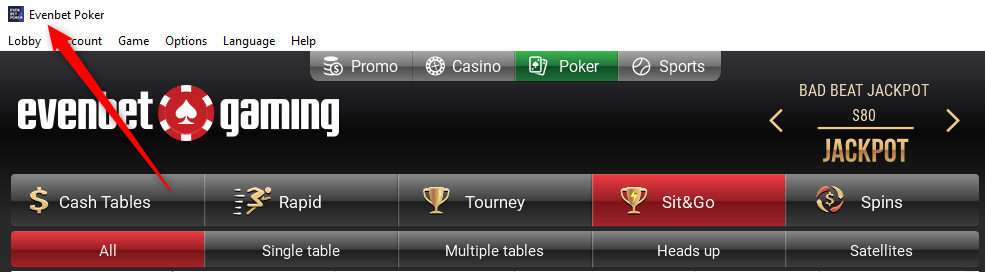
<property-str name="ClientTitle" value="Enterra Demo Poker"/>
EnableAutoLogoutByTimeout
Enables automatic logout of inactive players. When EnableAutoLogoutByTimeout = true and ClientAutoLogoutTimeout is greater than 0, a player who performs no actions in the Browser client, such as clicks, scrolling, key presses or touches, for ClientAutoLogoutTimeout seconds is logged out. Before the logout, the client shows a warning, and any action of the player closes it and restarts the countdown. The desktop and mobile apps always report the player as active, so their players are not logged out by this setting. Any other client connected to the server that does not report player activity is logged out after ClientAutoLogoutTimeout seconds. False by default.
<property-bool name="EnableAutoLogoutByTimeout" value="false"/>
ClientAutoLogoutTimeout
The player gets logged out after ClientAutoLogoutTimeout seconds of inactivity. In order to resume playing, the player has to log in again. Use 0 to turn the feature off. For the server to log out inactive players, EnableAutoLogoutByTimeout must also be enabled.
<property-uint name="ClientAutoLogoutTimeout" value="900"/>
RequireAccountActivation
If this feature is enabled, players are not allowed to log in until they pass the e-mail verification (using the activation page on the website). Possible values: true (the feature is enabled), false (the feature is disabled).
<property-bool name="RequireAccountActivation" value="false"/>
NumDigitsInActivationCode
Defines the number of digits in the activation code sent for the e-mail verification. Default value: 0. In this case, a long hex-string will be sent for activation. Possible values: any numeric value. For example, if you set it to 6, the players will receive a 6-digit activation code.
<property-uint name="NumDigitsInActivationCode " value="0"/>
StoreHashedPasswords
Store md5 hash of players' passwords instead of plain password text. Possible values: true (the feature is enabled), false (the feature is disabled).
<property-bool name="StoreHashedPasswords" value="true"/>
EnableGuests
This parameter enables guest registration of players with the username 'guest'. It is only available in QT mobile app. Possible values: true (the feature is enabled), false (the feature is disabled).
<property-bool name="EnableGuests" value="true"/>
AuthorizationTicketLifetime
This parameter is used in the client authorization on website. If the client application has not sent the auth code received after the authorization back to the server within AuthorizationTicketLifetime seconds, that auth code becomes invalid.
<property-uint name="AuthorizationTicketLifetime" value="120"/>
LongAuthorizationTicketLifetime
This parameter is used in the client app authorization. It defines the lifetime of the token, saved when the player enables 'Remember me' option. If it is enabled, the player must be logged in automatically within LongAuthorizationTicketLifetime seconds, after that the login token becomes invalid.
<property-uint name="LongAuthorizationTicketLifetime" value="2592000"/>
UseNickAsLoginAtAuthentication
This parameter allows players to log in using nickname. Possible values: true (the feature is enabled), false (the feature is disabled).
<property-bool name="UseNickAsLoginAtAuthentication" value="true"/>
UseEmailAsLoginAtAuthentication
This parameter allows players to log in using email address. Possible values: true (the feature is enabled), false (the feature is disabled).
<property-bool name="UseEmailAsLoginAtAuthentication" value="true"/>
UsePhoneAsLoginAtAuthentication
This parameter allows players to log in using phone number. Possible values: true (the feature is enabled), false (the feature is disabled).
<property-bool name="UsePhoneAsLoginAtAuthentication" value="true"/>
TfaMaxAttempts
This parameter sets the maximum number of attempts for two-factor authentication (2FA). If a player fails to enter the correct 2FA code within the specified number of attempts, their account will be restricted. In case of a 2FA lockout, Backoffice administrators can either reset the 2FA attempts for the player in the User Details section or disable 2FA. Simply unblocking the account will not work, as the account is not technically blocked and will not appear in the Blocked Users list.
<property-uint name="TfaMaxAttempts" value="5"/>
RequiredForLoginTFAType
Defines the type of two-factor authentication (2FA) required for login for all players. If the RequiredForLoginTFAType parameter is set to one of the specified values (tfa.sms, tfa.email, tfa.google-auth, tfa.otp, tfa.client-check), a valid 2FA code must be entered to complete the login process. The settings will only work if the data for them has been previously specified or configured.
- tfa.sms — two-factor authentication via SMS. A code is sent to the player's mobile phone via text message, which must be entered to complete the login process;
- tfa.email — two-factor authentication via email. A code is sent to the player's registered email address, which must be entered to complete the login process;.
- tfa.google-auth — two-factor authentication using the Google Authenticator app. The app generates time-based one-time passcodes that must be entered to complete the login process;
- tfa.otp — two-factor authentication using a generic one-time password (OTP code) applies to log in via phone number or email, to which the one time password should be sent and entered by the player for login;
- tfa.client-check — two-factor authentication provides additional client-side verification, such as checking the player's geolocation through the third-party service XPoint or other services. For information about integrating services for this verification, please contact the Evenbeter team;
- tfa.unknown — the setting indicates that no two-factor authentication is required for login. Authorization is performed without the need to enter a 2FA code.
<property-enum name="RequiredForLoginTFAType" value="tfa.unknown"/>
ObservedPeriodToCheckPasswordPolicyViolation
This parameter sets up a time period to check if there were too many attempts to log in using invalid password.
<property-uint name="ObservedPeriodToCheckPasswordPolicyViolation" value="300"/>
LockTimeAtPasswordPolicyViolation
Defines the time period, during which the player/IP will be blocked in case the MaxNumberOfInvalidPasswordAttempts was exceeded within ObservedPeriodToCheckPasswordPolicyViolation. After the period indicated in the setting, the player account/ the player's IP will be automatically unlocked. While the account is blocked, it will appear in the Blocked Users list, the IP will appear in the Prohibited IP List. If necessary, accounts/IPs can be unblocked through these pages before the end of the blocking period.
<property-uint name="LockTimeAtPasswordPolicyViolation" value="1800"/>
MaxNumberOfInvalidPasswordAttempts
This parameter sets up the number of login attempts with invalid password before the player/IP gets blocked.
<property-uint name="MaxNumberOfInvalidPasswordAttempts" value="5"/>
EnableCAVerificationForSSLChannel
Defines whether the certificate is checked. This is a security system setting, please, do not change its value.
<property-bool name="EnableCAVerificationForSSLChannel" value="true"/>
AllowIdenticalNickNameInSkins
Defines if there can be players with identical nicknames in case they belong to different skins. If true, then there can be a player with nickname ‘test’ in skin1 and a player with nickname ‘test’ in skin2. However, there still cannot be two players with nickname ‘test’ in the same skin. If false, the nickname uniqueness is checked regardless of the skin.
<property-bool name="AllowIdenticalNickNameInSkins" value="true"/>
AllowIdenticalEmailInSkins
Defines if there can be players with identical e-mail addresses in case they belong to different skins. If true, then there can be a player with e-mail ‘[email protected]’ in skin1 and a player with e-mail ‘[email protected]’ in skin2. However, there still cannot be two players with e-mail ‘[email protected]’ in the same skin. If false, the e-mail uniqueness is checked regardless of the skin.
<property-bool name="AllowIdenticalEmailInSkins" value="true"/>
AllowIdenticalPhoneNumInSkins
Defines if there can be players with identical phone numbers in case they belong to different skins. If true, then there can be a player with phone number ‘123456’ in skin1 and a player with phone number ‘123456’ in skin2. However, there still cannot be two players with phone number ‘123456’ in the same skin. If false, the phone number uniqueness is checked regardless of the skin.
<property-bool name="AllowIdenticalPhoneNumInSkins" value="true"/>
AllowIdenticalDisplayNameInSkins
Defines if there can be players with identical display names in case they belong to different skins. If true, then there can be a player with display name ‘test’ in skin1 and a player with display name ‘test’ in skin2. However, there still cannot be two players with display name ‘test’ in the same skin. If false, the display name uniqueness is checked regardless of the skin.
<property-bool name="AllowIdenticalDisplayNameInSkins" value="true"/>
RequireUniquePlayerDisplayName
If true, the system will check player's display name uniqueness. If false, the players will be able to have identical display names.
<property-bool name="RequireUniquePlayerDisplayName" value="true"/>
RequireSkinCheckOnPlayerLogin
Enables skin check at the login. If the player's skin does not correspond with the client app's skin, login will be unsuccessful, even if the player's credentials were correct.
<property-bool name="RequireSkinCheckOnPlayerLogin" value="false"/>
PhoneNumberCorrection
If enabled, the phone numbers, inserted by the players during the registration, will be saved in the database without non-numerical symbols, such as ‘+’, ‘-‘, etc. Default value: true.
<property-bool name="PhoneNumberCorrection" value="true"/>
BlockViolatorMethodType
Defines, what is blocked in case the player exceeds MaxNumberOfInvalidPasswordAttempts within ObservedPeriodToCheckPasswordPolicyViolation. Possible values:
- bvmt.none – nothing is blocked if the allowed number of invalid password attempts was exceeded;
- bvmt.account – the player's account is blocked if the allowed number of invalid password attempts was exceeded. After the period indicated in the LockTimeAtPasswordPolicyViolation setting, the player account is unlocked;
- bvmt.ip – the IP of the player who made login attempts is blocked if the allowed number of invalid password attempts was exceeded. After the period indicated in the LockTimeAtPasswordPolicyViolation setting, the player's IP is unlocked.
<property-enum name="BlockViolatorMethodType" value="bvmt.account"/>
ClientsOutputMessagesSizeHardLimitMb
The summarized maximum size (in Mb) of the client's outgoing messages. If it is exceeded, a disconnection takes place.
<property-uint name="ClientsOutputMessagesSizeHardLimitMb" value="10"/>
ClientsOutputMessagesSizeSoftLimitMb
The summarized maximum size (in Mb) of the client's outgoing messages. If it is exceeded, a countdown that lasts for ClientsOutputMessagesSizeSoftLimitTimeoutSeconds starts. If the size of the client's outgoing messages does not decrease during this time, the client is disconnected.
<property-uint name="ClientsOutputMessagesSizeSoftLimitMb" value="4"/>
ClientsOutputMessagesSizeSoftLimitTimeoutSeconds
The timeout to disconnect the client if the summarized maximum size (in Mb) of the client's outgoing messages exceeds ClientsOutputMessagesSizeSoftLimitMb.
<property-uint name="ClientsOutputMessagesSizeSoftLimitTimeoutSeconds" value="10"/>
MaxDBBulkInsertQuerySizeMb
This setting limits the maximum size of insert request sent to MySQL when bulk insert is used (this limitation does not apply to the first entry). The entries that were cut because of this limitation are added to the next request.
<property-uint name="MaxDBBulkInsertQuerySizeMb" value="5"/>
DefaultFrontendRequestTimeout
Sets the timeout (in seconds) for messages sent by the frontend server. If a message exceeds this timeout, it will not be processed by the server. This improves performance by preventing the handling of expired messages.
<property-uint name="DefaultFrontendRequestTimeout" value="0"/>
WebComponentRequestTimeout
Sets the timeout (in seconds) for messages sent from the web component. If a message exceeds this timeout, it will not be processed by the server. This improves performance by preventing the handling of expired messages.
<property-uint name="WebComponentRequestTimeout" value="0"/>
ForbiddenProcesses.win
Defines the list of process names (executables) that are considered forbidden during Native client usage on Windows. If a listed process is running when the player logs into the client, a Forbidden Process incident is triggered. Use the name + extension format (e.g., "App.exe"), as shown in Task Manager. Add multiple entries by duplicating the item value line. Note: Process names may be case-sensitive depending on the system configuration.
<property-str-list name="ForbiddenProcesses.win">
  <item value="App.exe"/>
</property-str-list>
ForbiddenProcesses.macosx
Defines the list of process names (applications) that are considered forbidden during Native client usage on macOS. If a listed process is running when the player logs into the client, a Forbidden Process incident is triggered. Use the application name format (e.g., "App"), as shown in Activity Monitor. Add multiple entries by duplicating the item value line. Note: Process names may be case-sensitive depending on the system configuration.
<property-str-list name="ForbiddenProcesses.macosx">
  <item value="App"/>
  <item value="App.app"/>
</property-str-list>
ForbiddenProcesses.html5
Defines the list of process names (applications) that are considered forbidden during Browser client usage. If a listed process is running when the player logs into the client, a Forbidden Process incident is triggered. Use the application name format (e.g., "App"), as displayed by the operating system or the browser's task manager. Add multiple entries by duplicating the item value line. Note: Process names may be case-sensitive depending on the system configuration.
<property-str-list name="ForbiddenProcesses.html5">
  <item value="App"/>
  <item value="App.exe"/>
</property-str-list>
ClientTrustedHosts
Defines the hosts, in URLs for which the parameters can be added (auth, playerId, etc.)
<property-str-list name="ClientTrustedHosts">
  <item value="111.111.1.11"/>
</property-str-list>
CompleteProfileRequirements
This setting allows you to specify profile data that must be filled out for the account to be marked as “Completed”.
![[]](data:image/png;base64,iVBORw0KGgoAAAANSUhEUgAAAQcAAAA7CAYAAAB2ZE/FAAAAAXNSR0IArs4c6QAAAARnQU1BAACxjwv8YQUAAAAJcEhZcwAAEnQAABJ0Ad5mH3gAAAoHSURBVHhe7Zz5b1XHFcf7r7VS2x9a9YduqhIICU4IgVaEVGpTpRVK26hNUQpIgRZsbJfdmBobhME2+44hQGxs9sWAwSzGmH0/9Wf8jnu5jLHfInjPfD/SyO/eO3PumXlzvnfm3AffMSGEiCBxEEJEkTgIIaJIHIQQUSQOQogoEgchRBSJgxAiisRBCBFF4iCEiCJxEEJEkTgIIaJIHIQQUSQOQogoEgchRBSJgxAiisRBCBFF4iCEiCJxEEJEkTgIIaJIHMQbwZ3bD2xzS6fNndVif/ikxqaWVdtH71XlWSpDmZwpfJ5aVhXscx/ux31LFYmDGPM0rPqmQGJAGRCCd70stGkf/semTV40WAY+c86vD4pFdbh/KSJxEGOWS9199rfP16SCO9fyf0H48i8N1vDfVmv/9pxd6em1u3fvhsJnznGNOi4UtMUP/Ckl3mhxePLkid2/f98ePHhgT58+Dcf8hWfPnoXzFD5nC20ePXqUORob5DsmrxICkeV9PNCzKy4Kf/1TnTU1HrK+G/1DgjBcoQ51aeMigT+lJBBFKw4euMlSyGC7efOmrVy50ubPn29Lly61CxcuWG1trTU2NtrDhw/D/VavXm2bNm2yx48fZ1qNnsOHD1t5ebmdOXMmcyY7CL4bN27YxYsX7dKlS8Gn1w3jwHgwLoxPMVOoFYMLw+yZ66zzSFdUCF5WOju6QlsXCPwqFYpWHAgIAjdZCLatW7cWZGIePHjQKisr7dy5c3bv3j27c+eONTU12a5du4aEKR9xOHnypNXU1NjVq1czZ0bPrVu3bO3atc/1fdGiRXbq1KnX+sTORRxYZWzcuDGI5auCPX4s0LMtIdE4ENR//3O9tX17Jhr8oym0xUYQiAGbpZKDKHpxaG9vDxPx9u3bQ09jAjvfINm7d29YMfB0jpGvOOQKQoUwVFdX29GjR8MxYrFv375hfX1V5CIOiO6qVavCeL8KeDtQqDcRBPOUskrbsfVINOizKdjAFjZ5o1EKbzGKXhyOHTuWOfNiwF65csXWrVtn169ft0OHDtmSJUusp6cnCMf58+etvr7eFi9ebNu3b7f+/v6MFbMTJ06EuggNWwlEx59wu3fvHnblkLZL3eGC5PTp01ZXVxd8BLYFBw4csGXLloUVBf7GtkmsDug3wvAyAaQ/+MuKgjFgW+T18R/f6BcrF64vX77c2traQl+OHz8efKAfly9fDm0An7FJm23btoUx4hhxguHEIenL+vXrh1ZLfX194Zhx5hrjwT0A0cNHxhE/GFf3n798H/QjW3h9GA/27ApbgA8nVNi8ORuiwZ5LwRY2sY2fxU5JiQMTigm2efPmMHGow9aAybVixYpwnlwCbZiQBAVPLAKD6/7kJWiYrElxSItB+pgJi92FCxfali1b7MiRI+GJyGcXjyTUxX98JMnZ2toaVgMEaGdnp61Zs+aFlQB9IigJXA/IGLSjP/SL/tFP+sI98dODuKqqKgQ44khd6uBzQ0ND2J5VVFSEVQqBCO4z52lD4TP2qRMTB/eFcx0dHUEkOEYYEEbGNy0OBAr9xydWhjt37gzXGSsgT0ObHTt2ZC0Q/L4gFuzZFp7wkyYssObGb14I8lwLtrCJ7bmzmjMeFy8ls60g6AkcJg1PvmQdJqQ/hQkqJiT5A0/iXbt2behJ728j0tuKkcTB7bK8dxusUpjUvjpIkhQHDyqeoh6IbiNJLPjSECwEDf2hX0A/6S/BxzLe7RCkjBvgB2NHwGOD+xOUyTFwn8+ePRuOERq2cLRL9sP9c18QZ+4L9A/BoR1gm3sktxWIMed6e3vDMXYQK75fPrOK4J7J72u0FOYNxeDy/4Px/7aO9rPRQM+lYAub2P70kxUZj4uXkkpI+pPXJ4zXYVI7fo6ns4NwbNiwIUxiD85sxcHtcrx///5QCAxWLlxLkxQHQNCY8AgM12JvH0YjDu5XUhCBccE+24SYnViQpscg7TN4v7mWtuu+IEo+Jognb4H8Pun7ug2Ei7reju+G81xHlBifbIUBCpFv8C3F++P+Zf03b0UDPZeCLWxie8rEqozHxUvJrBwI6vRkSU5cJ3aOICKYksFSCHHwwhI6TTrQmPA8KZubm0MQExx+b8ef5qxGfFWQJu2Xgxj6/TwAk/19VeLgxV/hjlYcKNyDlUM+SBwKR0nlHNLE6vhk5KnuYkLCjMmYDKhsxcHtjvZNSSzQHBJ2bAvIQ6TxJXVy+wI8SSkeXKxAeIMDviz3/nidfMWBfvqKhHNpu36czFukSd8Xm/SN7yOZJE5CHezlIhSF2Fa4OJQNBHJ722COpBAFW9jE9qfTta3ImVzFgYDitwpsQVh1kBdoaWkJx/ygyBlJHJicLHVJxjGJk3ZJvPFlY3u43x4kA42VCysCztGONmxHSGqmoS6JVdryt6urK6wKSN4hAAQM5whY9uj4wB6eY56++JmvOJC/8PvSX09Icm98IrB9ZZP0hfwGY8WbFhcLcjX+ZoQ25CY8B0QOhs+IHG+QPAn7uhOSyZVD49o9zwV4PgVbvnL4+p9KSOZMruIAPGEJZCYY18nYp4N4JHEgyHj1SHtPrmGXJBkZfM7zl+PYUzMtDtgg0DiHXyQGkzmDJOn6FJ7O7iv94EdWbD/cjz179gzZy0cceBuDAPi9ebOR3DZ57sSTh/jC2DLGSV892cg40hf/LvCTNowLqx9vw+fu7u7QJp+EZCFeZfqPnz4YP99mz6yLBnouBVvYxPam5o6Mx8VL0YpDIfAVQLYTzGES0x47STgm6LJ9quEH9oYThTQj1ffraf9yJSlo9A3bSUEFH5O0TyP5yvm0PbcVO59rQrIwP4JycVhgE9+aYy1N+6LBnk3BBrawOWVipd2+NSjaxcyYFgeRHUlxKGUK8fPpobzD2/Pss99V2IHW3H8lSVtsYAub9bUHMp4WNxIHMcRYEQfI/x9eDa4eJr1Tbu/+ao59/sdKO3zwaDT4X1YODbShLTaw9cWM+udWScWMxEGMSQrxT7YHVw+DuYfxv/zKpk2ZZbU1zdbb2xcVgmShDnU/njortMXG7z9eZhcvDOZiSgGJgxizFOI/e/HtBcE9YeDp//OfzLDpv/nKqivrbX9ru3V39wwJAp85xzXqUJc2tP1ixuogDKWyagCJgxjz5PvfxAWBYIsxoTzkDcb9Yqb99Eef2Y+/P91++L2p9oPvfhQKnznHNepQd/J7FVZX0xqSq6UkDCBxEG8E+f4HswgEOQhWEZPeWWBl4+bZxLe+DiuDt3/2ZSh8fn/cXPvtr6ts9j/WWcuGNuu/eTeIQqkJA0gchBBRJA5CiCgSByFEFImDECKKxEEIEUXiIISIInEQQkSROAghokgchBBRJA5CiCgSByFEFImDECKKxEEIEUXiIISIInEQQkSROAghokgchBBRJA5CiAhm/wN8ReoynIa/VQAAAABJRU5ErkJggg==)
Additionally, this setting is closely connected with account verification. Backoffice administrators will not be able to approve KYC documents for the user in User Details - Verification section unless their profile is complete.
![[]](/assets/images/KYC-6ea43fdaf949ff4613054df644568cbb.png)
<property-str-list name="CompleteProfileRequirements">
  <item value="password"/>
  <item value="nick"/>
Possible values:
"nick"
"password"
"city"
"skin"
"name"
"e-mail"
"phone-number"
"gender"
"address"
"country"
"zip-code"
"family-name"
"middle-name"
"display-name"
"date-of-birth"
"verified"
"kyc-done"
"email-verified"
"state-id"
SkipRemoveFurtherAuthOnHTML5Reconnect
This server-side setting improves connection stability and ensures successful reconnection to the poker app in environments where the Evenbeter poker web application is integrated into another mobile application. When enabled, if a reconnect occurs from the Browser client, the Auth token created during the createSessionForPlayer call is not deleted, allowing for a smoother reconnection process.
<property-bool name="SkipRemoveFurtherAuthOnHTML5Reconnect" value="false"/>
StoreExternalSessionIdInDB
Technical setting. When enabled, the system saves player externalSessionId values to the tm_player_external_session_id table in addition to the in-memory cache. Each record in the table exists as long as the corresponding player data remains in the cache.
<property-bool name="StoreExternalSessionIdInDB" value="false"/>